
Six AI agents that run inside your ad accounts and CRM
We would rather show you one running than describe it. Pick the one that matches the leak you already know about, and we will run it against your data on the call.
Read-only access is enough to run the demo.
Pick the agent that fixes your biggest leak
Each one is independent. They read the same attribution, call classification and ICP definition, which is why they act on a signal rather than a guess.
Speed-to-lead agent
Answers every lead in under a minute and works toward a booked appointment.
See how it worksGTM agent
Runs outbound against your ICP and nothing else, with a person on every send.
See how it worksAudience agent
Builds audiences from real signals, enriches the accounts, and keeps LinkedIn in step.
See how it worksNegative keyword agent
Reads every search term nightly and proposes the negatives, with approval before anything lands.
See how it worksBudget agent
Paces every budget daily and raises an alarm before a month overspends, not after.
See how it worksWebsite agent
Runs landing page experiments and calls them on booked jobs, not on clicks.
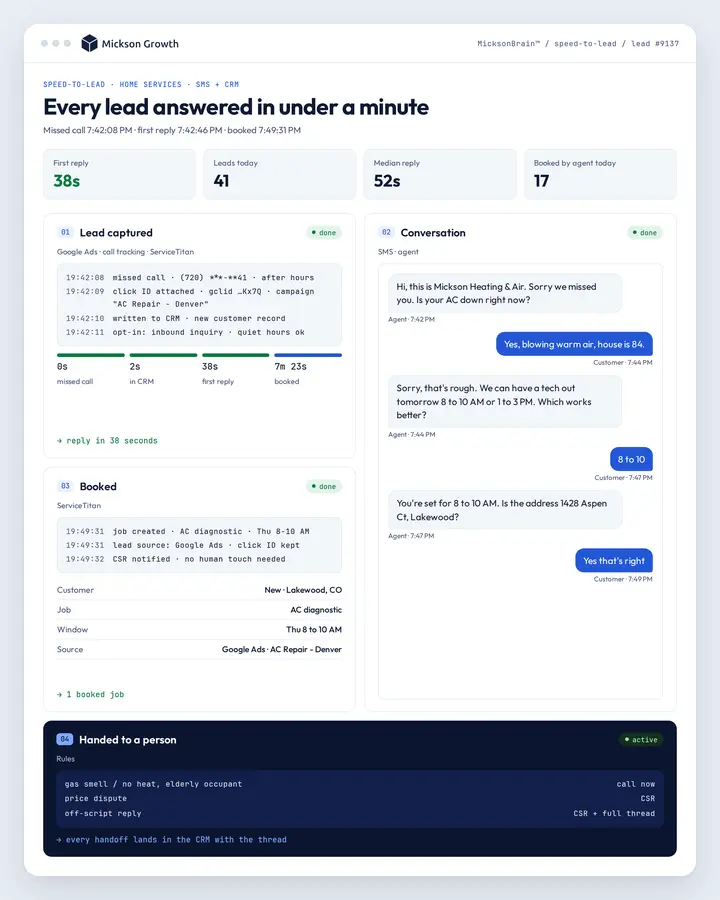
See how it worksSpeed-to-lead agent: a reply to every lead in under a minute
Every form fill, ad lead and missed call gets a reply inside a minute, written to your CRM with its click ID still attached.
It works the conversation toward a booked appointment and hands anything off-script to a person with the whole thread already in the CRM.
Lead arrives
Form, ad lead or missed call, with the click ID attached.
Written to the CRM
Straight in. No middleware holding the record hostage.
Replies in under a minute
And works the conversation toward a booked time.
Hands off when it should
Emergencies and anything off-script go to a person.
Fill in any form on this site and you get a personal reply from Drew within a minute, with his calendar link in it, and the booking step opens inline on the thank-you page rather than in an email you have to go and find. That is the agent, running on us before we point it at anyone else.
On SMS. Opt-in is captured at the point of inquiry and recorded against the lead. Messaging runs inside quiet hours set per market. A one-word opt-out stops it permanently and is written back, so no other campaign picks the number up.
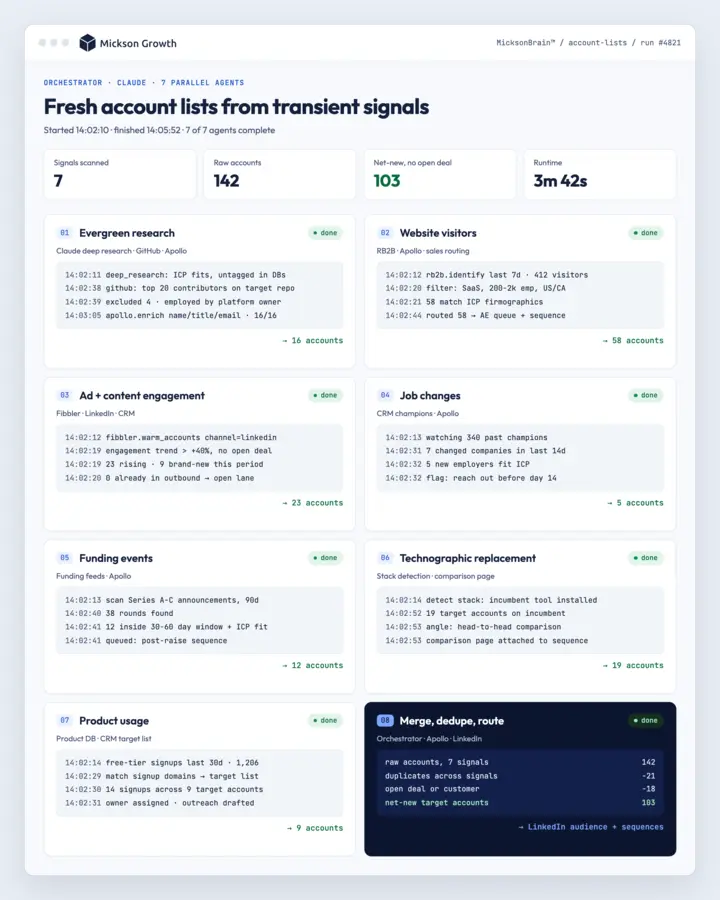
GTM agent: warm ICP accounts, verified contacts, drafted outreach
It watches for accounts warming up on your ads and your site, filters them against your ICP, and suppresses current customers and open deals before anyone is contacted.
It finds the buying committee, verifies the contact details, and drafts against the real signal. A person approves every send.
Spot the signal
Accounts warming up on your ads and your website.
Filter and suppress
Against your ICP, your customer list and your open deals.
Find the committee
The right people, with contact details verified.
Draft, then a person sends
Written against the signal, approved by a human.
One ICP definition drives the whole engine: warm account detection, enrichment, the outbound sequence and the write-back, instead of four tools each with its own idea of who the customer is. The daily digest reports what was sent and what replied, so the question "is outbound working" has an answer before the quarter ends.
Audience agent: LinkedIn audiences that stay in sync with your ICP
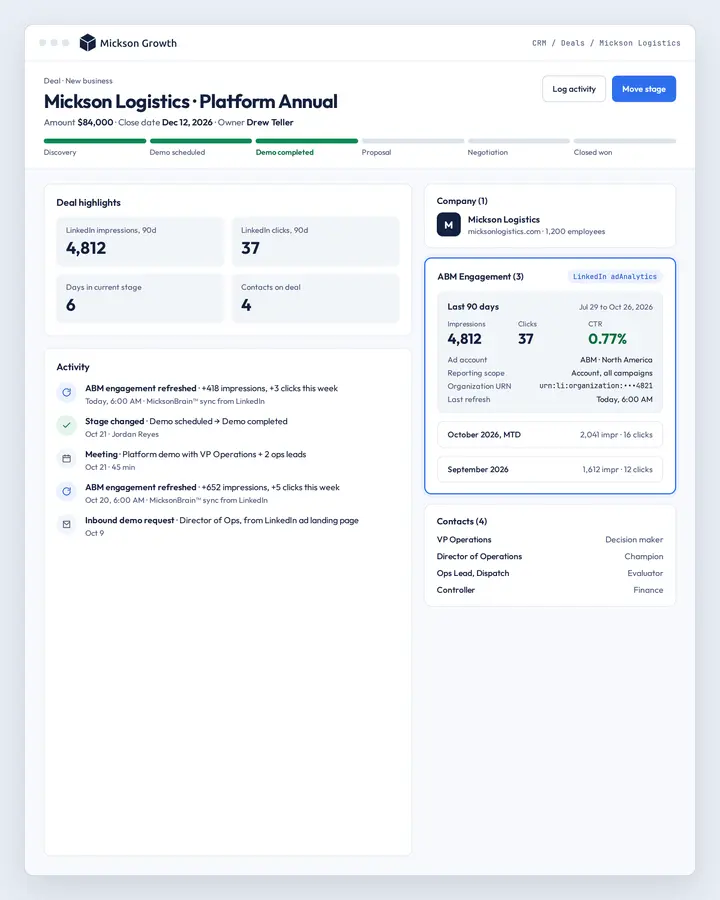
It turns a signal list into a company audience, enriches each account, and keeps the audience in step with the list instead of leaving a one-time upload to go stale.
It also reports the other direction: which ICP accounts your ads have actually reached, and which ones they have not.
Read the signals
Ad engagement, site visits and the ICP list in your CRM.
Enrich the accounts
So a company name becomes something you can target.
Keep LinkedIn in step
Additions and removals, on a schedule, not by hand.
Report the coverage
ICP accounts reached, and the ones still not reached.
Every company their LinkedIn ads reached is pulled weekly and matched against the ICP lists their CRM holds, so the report answers the question the board actually asks: of the named accounts we care about, how many have we reached this quarter, and which ones have we not touched at all. The "not reached" list is the one the team works from.
Negative keyword agent: wasted search spend caught every night
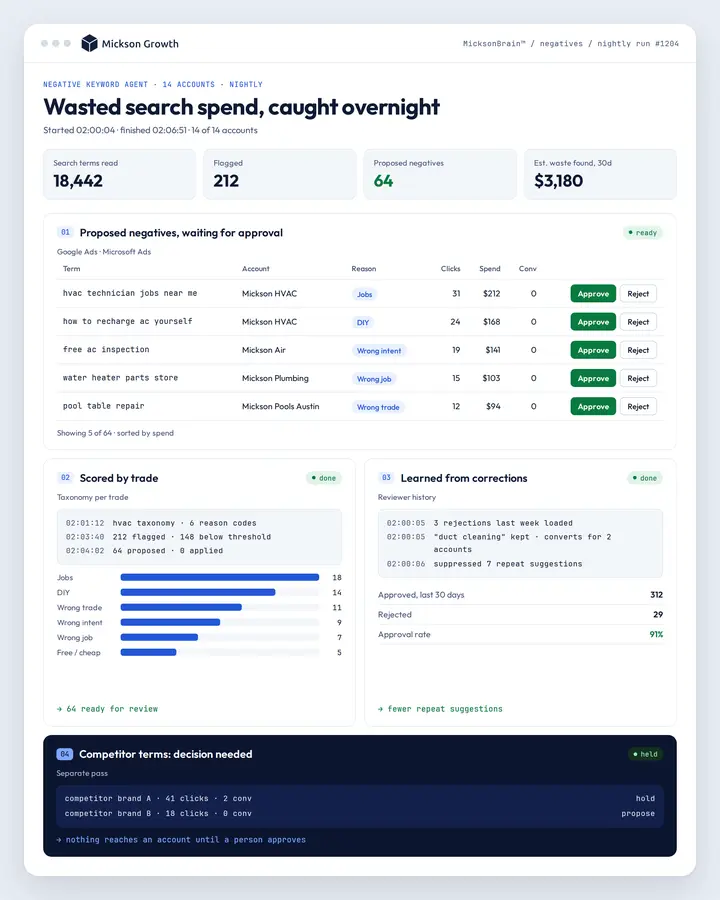
It reads the search terms across every account every night, scores them against a taxonomy built per trade, and proposes the negatives rather than quietly applying them.
Competitor terms get their own treatment, because blocking a competitor name is a decision rather than a cleanup.
Read every search term
Nightly, across every account, not at the monthly meeting.
Score against the trade
Wrong trade, wrong intent, wrong job, each handled differently.
Propose, do not apply
The list goes to a person before anything reaches the account.
Learn from corrections
A rejected suggestion changes what it proposes next time.
It runs nightly across every home services account we manage and holds its suggestions for approval, with a separate pass for competitor brand terms. Corrections are recorded, so a negative a human rejects once does not come back the following week wearing the same hat.
Budget agent: overspend flagged the same day
It takes a daily spend snapshot for every account and channel, compares it against the month’s plan, and forecasts where the month lands at the current pace.
When an account is pacing to blow through the number, it raises an emergency alert the same day rather than at the month-end reconciliation.
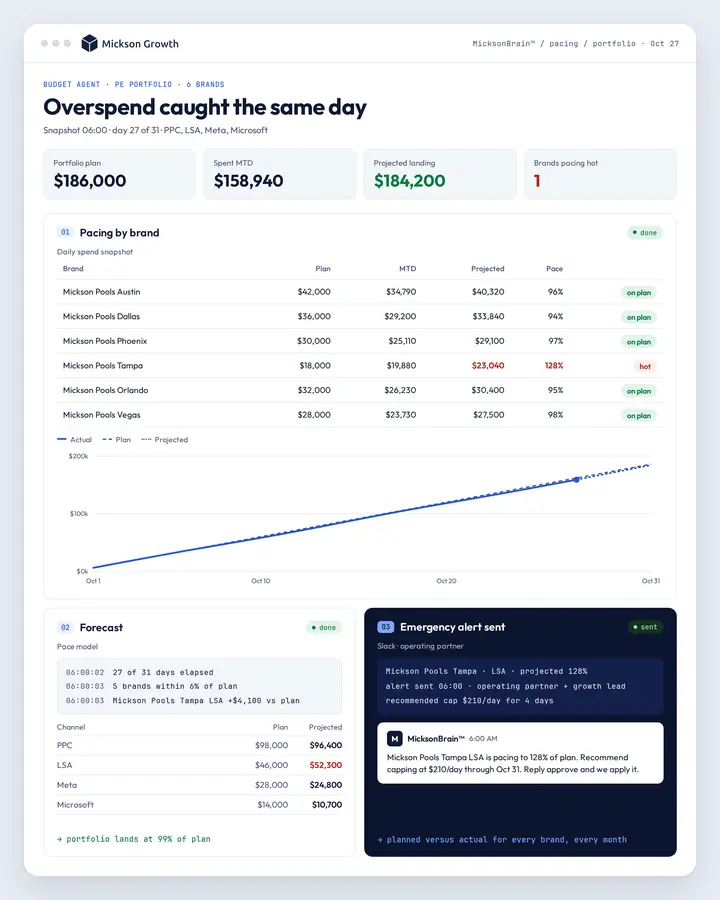
Snapshot every day
Spend per account and per channel, PPC, LSA, Meta and Bing.
Pace against the plan
Where the month lands if nothing changes.
Alert before the overspend
Same day, to a person, with the account named.
Report the landing
Planned against actual, for every brand, every month.
Pacing runs across every brand in the portfolio at once, so an operating partner sees one list rather than chasing each general manager for a number. Budget emergency alerts fire the day an account starts pacing hot, which is the only time the information is still worth anything.
Website agent: landing page tests judged on booked revenue
It splits traffic between page versions, tracks each visitor through the funnel, and reports the result per version with spend attributed by visit share.
The decision rule is written before the test starts, and the number it is judged on is bookings and revenue rather than clicks.
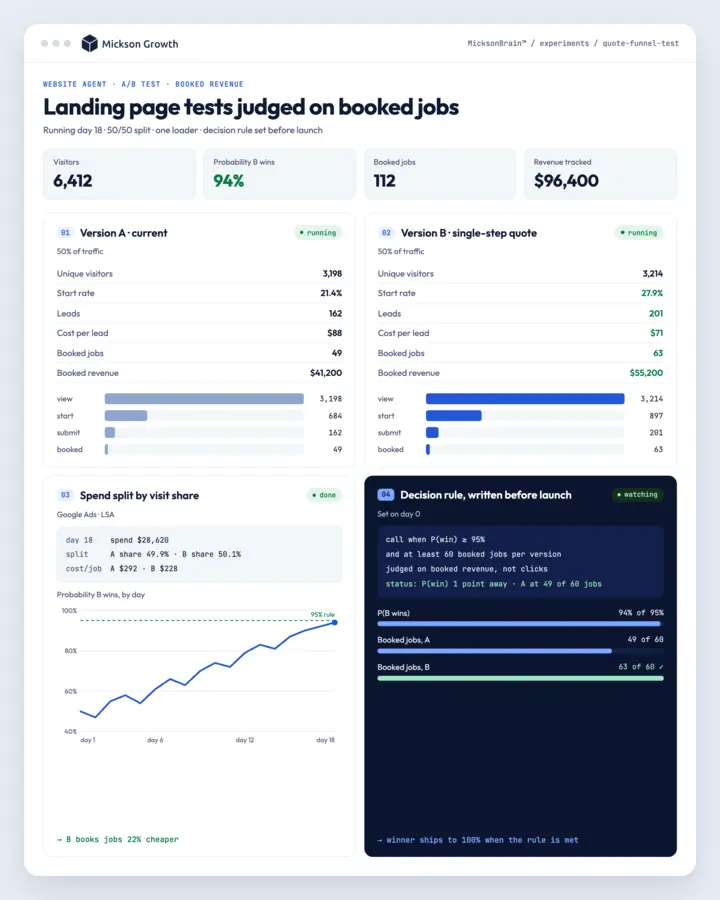
Split the traffic
Two versions of the page, an even split, one loader.
Follow the funnel
Every step from first view through to a booked job.
Score it honestly
Probability to win, with spend split by visit share.
Call it on the rule
The decision rule is set before the test, not after.
Two versions of their quote funnel run against each other on our own testing host, with a per-version funnel report in their nightly dashboard: unique visitors, start rate, probability to win, cost per lead and the booked revenue behind each version. The test is called on the rule that was written down before it started.
Every agent runs on MicksonBrain™
They read the same attribution, call scoring and ICP definition as everything else, and every change to a live account waits for a person to approve it.
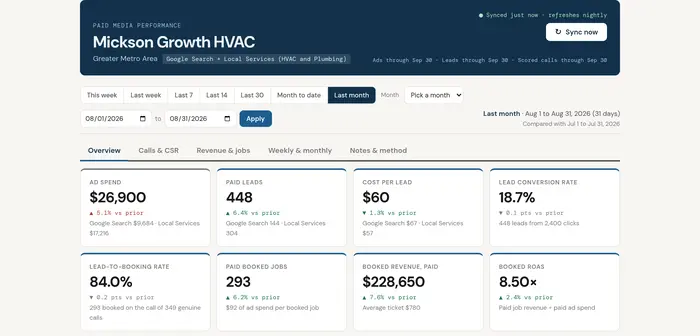
See it
Ad to call to CRM job, across every channel you run.
Hear it
Every call transcribed and labeled booked, junk or missed.
Act on it
Account changes need human approval, with one-click rollback.
Where a person approves before an agent acts
Four places the agent stops and a person starts.
Emergencies go to a person
Anything off-script is handed over immediately, with the full thread in the CRM.
Every outbound send is approved
The agent finds the signal and drafts. A person presses send.
Consent, quiet hours, opt-out
Captured at inquiry, run inside quiet hours, one word stops it permanently.
Account changes stay gated
Same approval and one-click rollback as the rest of the platform.
Demo an agent on your data
Tell us which agent and what you run today. We will set up a read-only view and run it in front of you.
- Pick a time on the spot. The calendar opens as soon as you submit.
- Read-only is enough. Nothing writes to a live account during a demo.
- Your data, not a sample. You see what the agent finds in your own account.
- Not sure which one? The free 48-hour teardown usually makes the answer obvious.
Questions about the agents
What does a demo actually involve?
We connect the agent to a read-only view of your own account and run it in front of you. You see what it would have found, said or proposed on your real data rather than on a sample set.
Does a person ever get involved?
Yes, and in the places that matter. Reply to every lead in under a minute hands anything off-script to a person with the whole thread in the CRM. The GTM agent finds warm ICP accounts and drafts the outreach drafts and a person presses send. The negative keyword agent proposes and a person approves. Nothing writes to a live ad account without approval and a one-click rollback.
How do you handle SMS consent, quiet hours and opt-out?
Consent is captured at the point of inquiry and recorded against the lead. Messaging runs inside quiet hours set per market, and a one-word opt-out stops it permanently and is written back so no other campaign picks the number up.
Do we have to take all six?
No. Each one is independent. Most companies start with whichever one matches the leak they already know about, which is usually speed to lead for home services and the audience or GTM agent for B2B.
What do you need from us to run a demo?
Read access to the account the agent would work on. For speed-to-lead that is the CRM and your missed-call volume. For the GTM and audience agents it is your ICP definition, your customer list and your open deals, so suppression works from the first run.
What happens on the call
Thirty minutes with Drew. Bring the part of your funnel that leaks.
For home services from $5M, PE-backed platforms, and B2B teams with a real ICP. If that is not you yet, we will say so.
- Thirty minutes with Drew, not a sales rep.
- We open your live accounts and your CRM.
- You leave with the first two or three things we would change.
- No long contracts. You own the accounts and the data.